
If your purchase was unsuccessful, and you received an error in the process, perform the following troubleshooting steps:
- Check if your payment methods are working correctly, e.g. make sure your credit card is not expired and that the funds are sufficient.
- Try using a different network connection.
- Restart the game. If the payment system is not initialized properly, a simple restart may solve the issue.
- Restart your device.
If the above instructions did not help you, perhaps you should consider the features of the payment system you use and if necessary, contact their support services. Their expertise may be able to pinpoint a solution that addresses your specific needs.
Website/Android APK
Epoch
In case any of the payment methods didn't work on the Epoch website, or you experienced other payment-related issues, please contact Epoch support.
You can also change your payment system from Epoch to SegPay in the game settings.
SegPay is an alternative payment system that could work better for you!
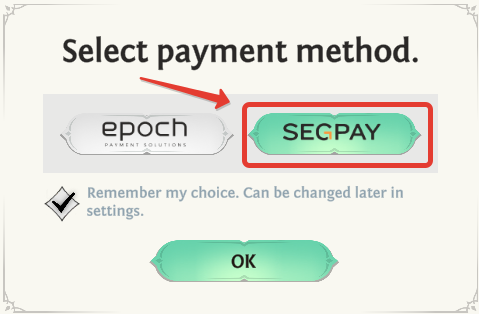
SegPay
If payment methods on the SegPay website fail or other payment issues arise, contact SegPay support. Consider switching to an Epoch payment system for a potentially smoother experience.
If all of the above didn't help, please contact in-game support service, and we'll look into your issue. Make sure to include the following information in your support ticket:
- Description of actions which lead to the error occurrence
- Screenshots of errors which you face while trying to make a purchase
- Whether the funds were debited from your bank account.
Comments
1 comment
I want change the payment by wallet
Please sign in to leave a comment.